Context across your team's tools
The answer is in your tools. Just not in one place.
The commit is in GitLab, the decision is in a chat thread, and the test data is in Subversion. Coryll connects to the tools your team already runs, finds the pieces behind any question, and cites every one. It runs on a server inside your network.
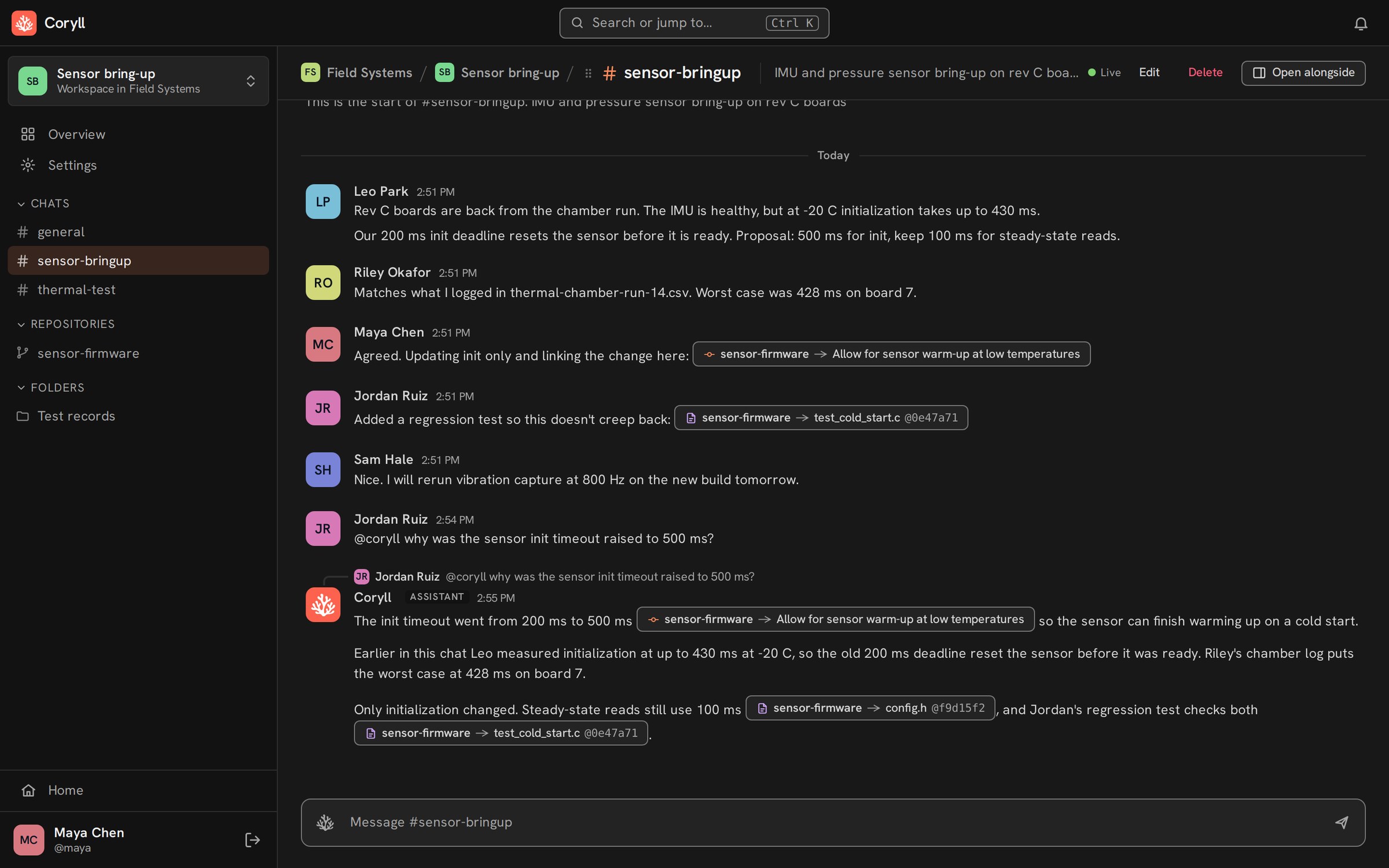
f9d15f2 · @maya
Allow for sensor warm-up at low temperatures
Leo Park · Tue 2:51 PM
At −20 °C init takes up to 430 ms. Proposal: 500 ms for init, keep 100 ms for reads.
r418 · thermal-chamber-run-14.csv
Worst case 428 ms on board 7.
Why was the sensor init timeout raised to 500 ms?
 Coryll
At −20 °C the sensor took up to 430 ms to initialize, so the old 200 ms deadline reset it before it was ready. The team raised the init timeout to 500 ms. Steady-state reads still use 100 ms.
Read with your own access · answered on your server
Every tool keeps its own piece of the story
Engineering teams on internal networks run a full stack: a code host, a tracker, a wiki, a chat system, file shares. Each one is good at its job. None of them can tell you why something happened.
Lives in the code host
The commit says what changed. It rarely says what the team argued about first.
Lives in a chat thread
The reasoning scrolls away within a week, in a channel the new engineer never joined.
Lives in a file somewhere
The test run that justified it sits in a repository or share that nobody links to.
Coryll doesn't replace these tools. It reads across them, as you, and brings back the pieces with their sources.
Connect once. Ask anything. Hand off the work.
Three steps, shown in the real product with a fictional demo team.
STEP 1 · CONNECT
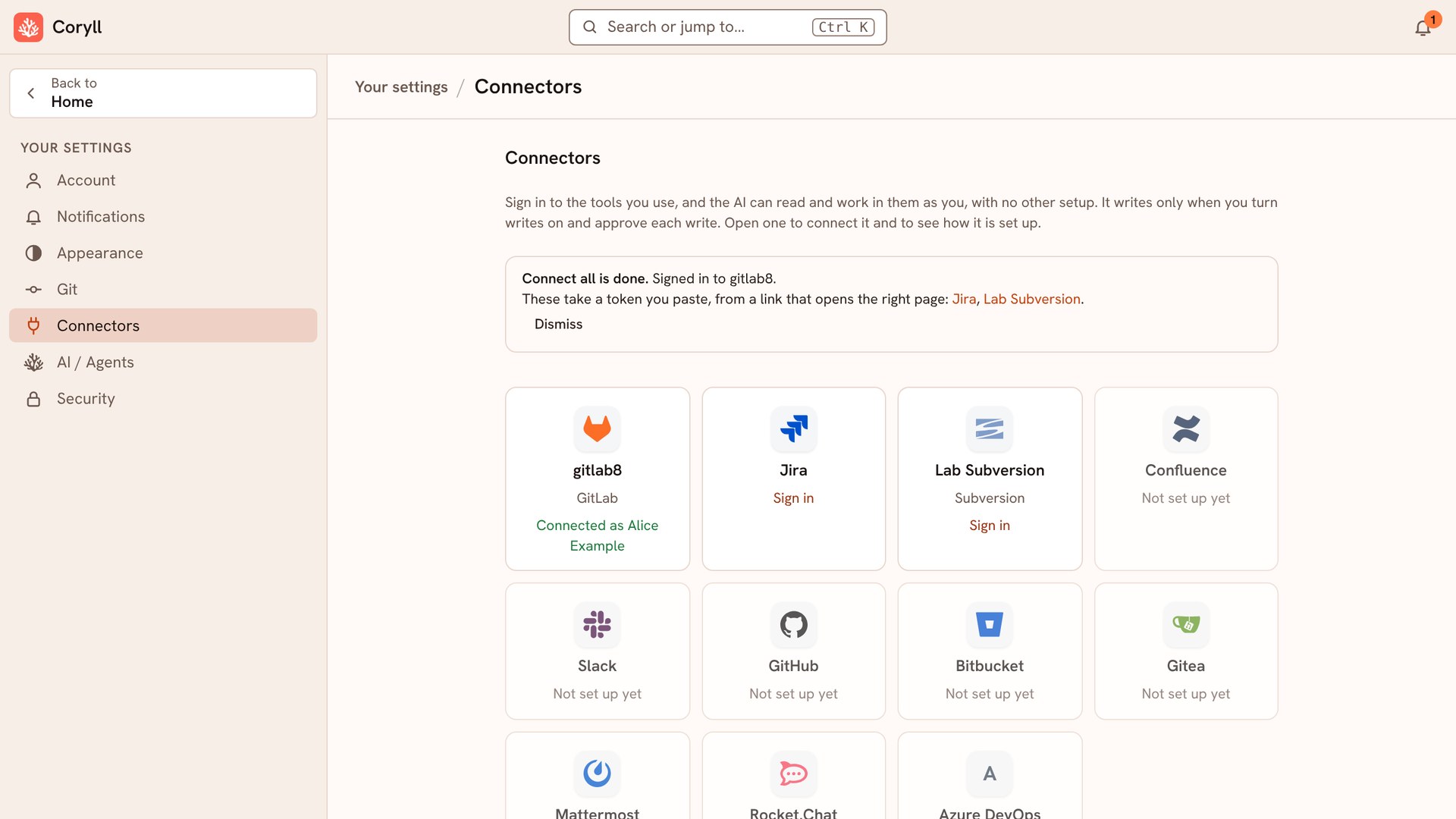
Sign in to the tools you already use
An admin adds each system once. Then everyone signs in with their own account, so Coryll only ever sees what that person can see.
- 1One tile per system, signed in or waiting.
- 2A shortcut for tools that take a token you paste.
 12
STEP 2 · ASK
Ask where the work happens
Mention @coryll in a team chat, or ask privately from any page. Every claim in the answer links to the commit, message or file it came from.
- 3The question, asked in the channel where it was discussed.
- 4Citations pinned to the exact commit and file revision.
 34
STEP 3 · ACT
Hand off the follow-up, and approve it
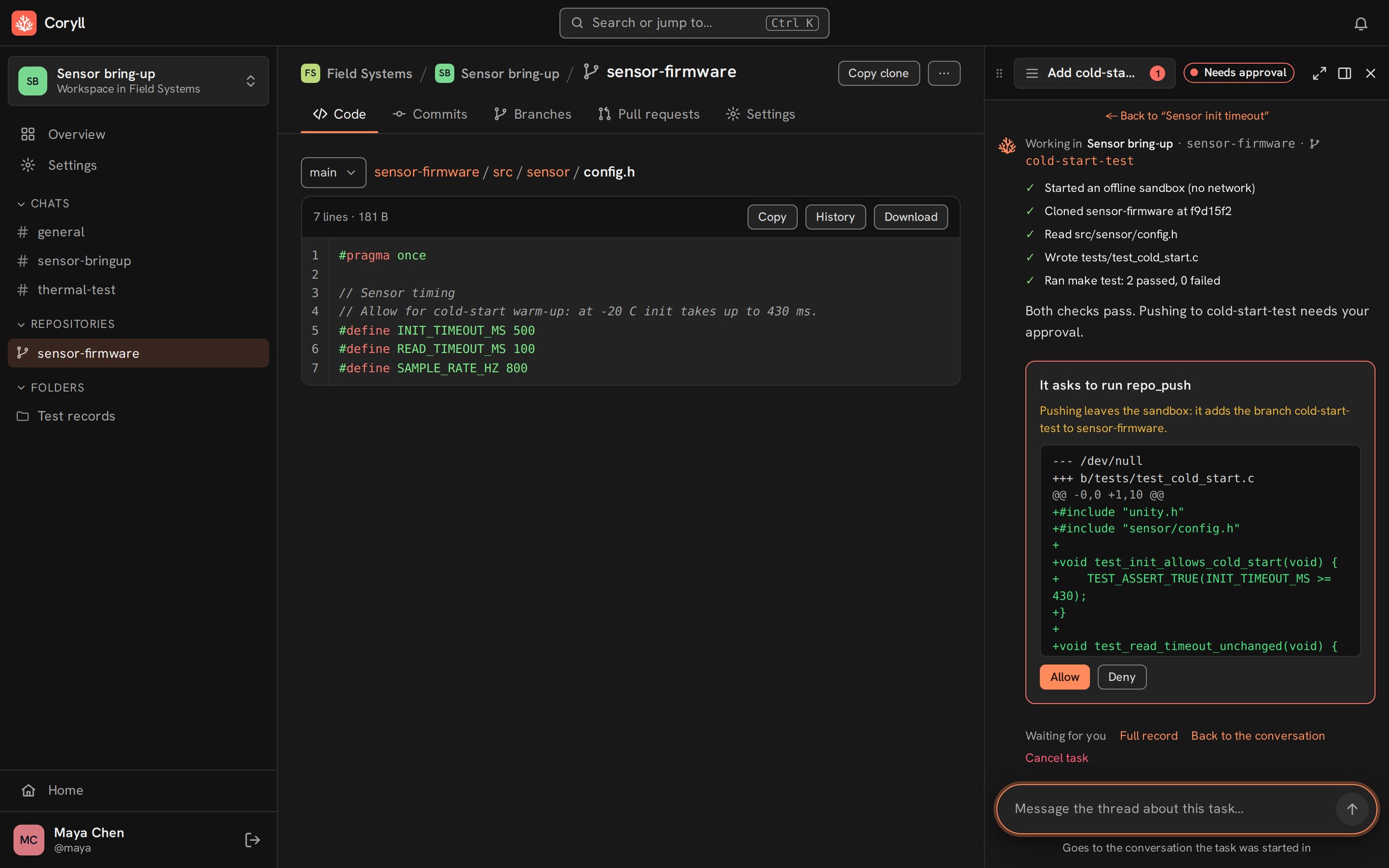
Ask the agent to do the work the answer points to. It builds and tests in a sandbox with no network, then waits for a person before anything leaves it.
- 5Each step it took, in order.
- 6The push it wants to make, with Allow and Deny.
 56
Context that follows your rules
Pulling everything together is only useful if it doesn't leak. These rules hold on every answer and every task.
It reads as you
Every connector uses your own sign-in, never a shared service account. If you can't open it in the source tool, Coryll can't either.
It asks before it writes
Comments, merge requests and pushes wait for your approval, unless you chose to allow that action.
It keeps one timeline
Each connected project is bound to a space. Its history joins that space's event log, next to your own commits and chats.
It stays in the building
The model runs on your server's own GPU. There is no cloud API, no telemetry and no licence server.
What a security reviewer asks first
Shipped and planned, kept apart.
| AI MODEL | Runs on the server's own GPU with llama.cpp. No cloud model API in any build. | ● Shipped |
|---|---|---|
| OUTBOUND TRAFFIC | None by default. Air-gapped mode refuses to start unless outbound traffic is off. | ● Shipped |
| CONNECTOR ACCESS | Per-person sign-in. Each write asks first unless the person allows that action. | ● Shipped |
| AGENT SANDBOX | No network, read-only root, no capabilities. Every push needs approval. | ● Shipped |
| SIGN-IN | Passwords with TOTP or FIDO2 security keys, both offline. | ● Shipped |
| AUDIT | Append-only event log and read audit log, exportable as JSON lines. | ● Shipped |
| SSO (SAML, OIDC) | For teams that sign in through an identity provider. | ○ Planned |
| SIGNED OFFLINE INSTALLER | Signed images and bundle you can verify before installing. | ○ Planned |
Start with the systems you already run
Coryll connects to what's there. Where a team has nothing yet, it brings its own.
- GitLabself-managed or gitlab.com
- Subversionon your network
- Slackwhere policy allows cloud access
More systems are in development. Tell us what your team runs, and we'll confirm editions and access during the pilot.
- Git hosting with merge requestsrepositories, branches, reviews
- Team chatchannels, @coryll
- Shared folderswith version history